
Are You Getting the Most out of ChemCart 2025?
- October 8, 2026
Introduction
Highlights:- Preview files instantly – View PDFs and linked documents directly inside ChemCart without downloading.
- Eliminate workflow interruptions – Access web-based documents and external databases without ever leaving your form.
- Automate external searches with tags – Use embedded hyperlinks and tags to instantly search databases like PubChem with one click.
Main Content
Document Preview
When uploading files into your applications, you can already view the file name and type, and open or download them directly within ChemCart. But with the Document Preview feature, you can take things a step further.
You can now add a preview window to your custom form that displays the document directly
within ChemCart.
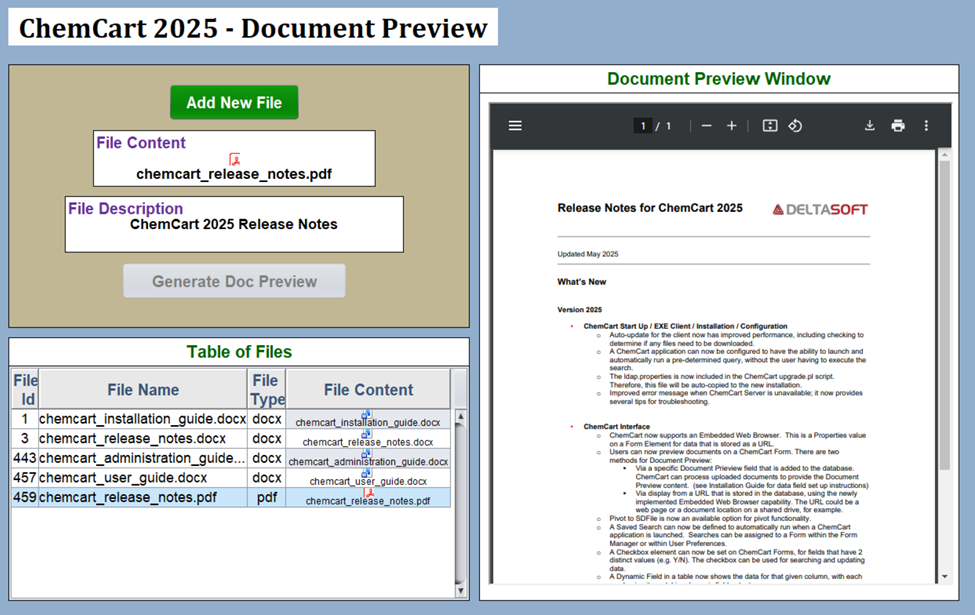
If you’re reviewing multiple PDFs on a notebook page, there’s no need to download each one or open them in separate windows. Simply click through the files in your table, and a preview appears instantly. This is especially valuable when working with large datasets containing numerous documents and protocols.
End Result: Less clicking, fewer downloads, and significantly faster data review.
Website Preview
Similar to file preview, ChemCart also allows you to preview documents stored externally via URL.
If your organization stores data in platforms like Dropbox, SharePoint, or SVN, you can save the document link in ChemCart and preview it directly within your form – without opening a new browser tab.
No More:
- Uploading the same file in multiple systems
- Jumping between browser windows
- Downloading files just to quickly review content
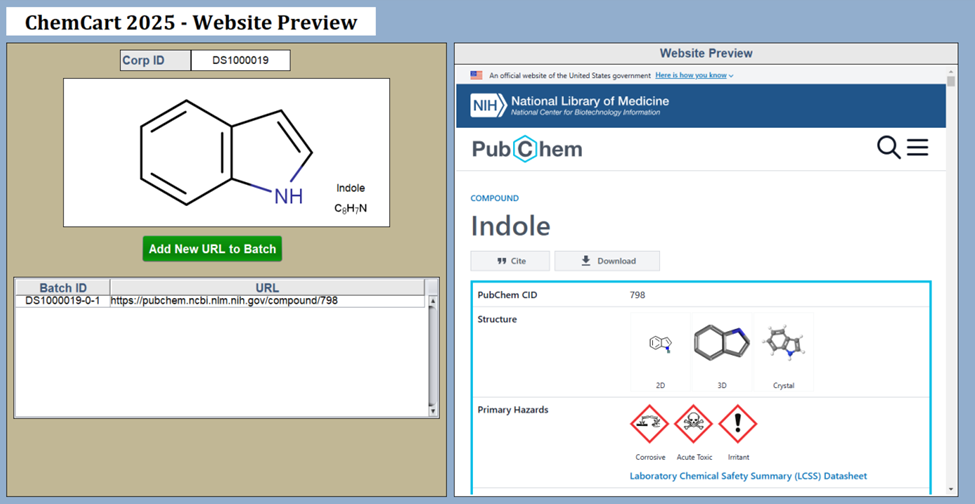
Instead, everything stays centralized inside ChemCart, keeping your workflow uninterrupted and efficient.
End Result: No extra tabs, no downloads—more time for data review without leaving ChemCart.
Embedded Hyperlinks in Labels (Powered by Tags)
Many scientific workflows require frequent reference to external databases such as NCBI or PubChem. Typically, this means keeping those sites open in another browser tab while working inside ChemCart.
Now, with embedded hyperlinks in labels, you can place direct links inside your custom forms for quick access.
You might be wondering:
“If I already have these websites bookmarked, why add them to my form?”
The Answer: Tags
Tags allow you to dynamically pass field data into a URL, automating your external searches.
Example: CAS Number Lookup in NCBI
Imagine you’re a medicinal chemist who frequently looks up CAS numbers in NCBI.
Here’s how you can streamline the process:
- Assign a tag (e.g., “cas”) to your CAS number field.
- Embed that tag into an NCBI search URL inside a label hyperlink.
- Click the hyperlink from within your form.
When clicked, ChemCart automatically launches NCBI and runs a search for that specific CAS number, without any manual typing required.
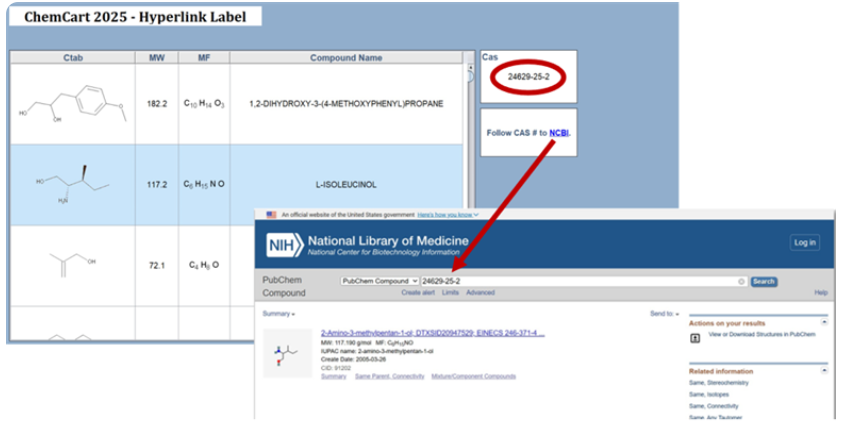
End Result: One click launches a pre-filled database search, delivering the data you need instantly.
Conclusion
Small Setup, Big Impact
These features take only minutes to configure in ChemCart’s user-friendly Design Mode, but the time savings add up quickly, especially when handling high volumes of data. At DeltaSoft, many of our newest features in ChemCart 2025 were developed directly from customer feedback. And with ChemCart 2026 already in development, even more enhancements are on the way. Your input drives innovation.
If you have ideas, feature requests, or feedback on what you love about ChemCart, we’d love to hear from you. Send your suggestions to info@deltasoftinc.com, and who knows? Your idea might just make it into the next release (and you might even earn a shoutout!). Stay tuned for what’s next and be sure to follow the quarterly release of our newsletter.
